Thanks for your question. If possible, please try the command : Copper Pour (menu: Fabrication > Copper Pour).
1. Select any closed boundary object or polygon. (optional)
2. Review and configure the options for Copper Pour. (see below).
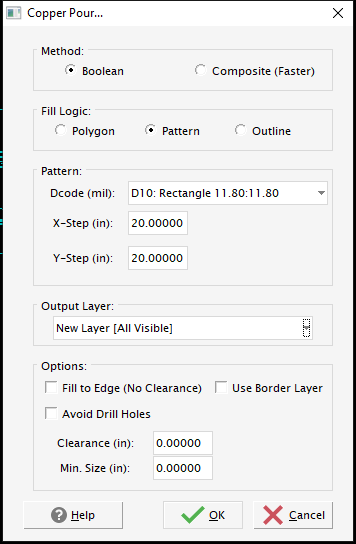
3. Press OK, to start. You do not have to select objects before using Copper Pour; and may draw a boundary around the specific area you wish to have filled.
Note: Here's a few related links from the help center, https://numericalinnovations.freshdesk.com/support/search/topics?term=Copper%20Pour
Was this article helpful?
That’s Great!
Thank you for your feedback
Sorry! We couldn't be helpful
Thank you for your feedback
Feedback sent
We appreciate your effort and will try to fix the article