Requires: FAB3000 V8.6+
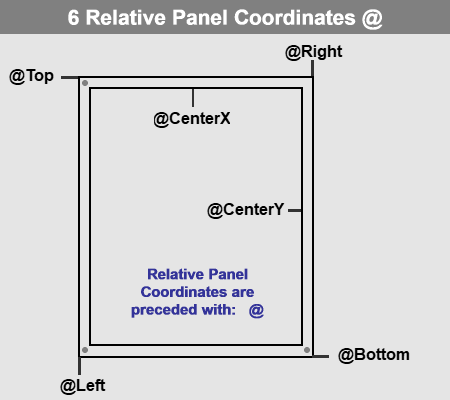
Relative Panel coordinate identifiers simplify creating Panel Templates. Relative Panel coordinate identifiers are case-insensitive.
Important: All Relative Panel Coordinates begin with the symbol: @
@ Relative Panel Coordinate Identifiers:
- @Top Outer Top Side of Panel
- @Left Outer Left Side of Panel
- @Right Outer Right Side of Panel
- @Bottom Outer Bottom Side of Panel
- @CenterX Horizontal Center of Panel
- @CenterY Vertical Center of Panel
- @MarginTop Top Margin of Panel
- @MarginLeft Left Margin of Panel
- @MarginRight Right Margin of Panel
- @MarginBottom Bottom Margin of Panel
Abbreviated Identifiers : To simplify relative panel coordinates, all identifiers have abbreviations.
- @T equals @Top
- @L equals @Left
- @R equals @Right
- @B equals @Bottom
- @CX equals @CenterX
- @CY equals @CenterY
- @MT equals @MarginTop
- @ML equals @MarginLeft
- @MR equals @MarginRight
- @MB equals @MarginBottom
Examples:
@Right-1 Would result in -1 unit (from the Panel Right side)
@Bottom+0.25 Would result in 0.25 unit (from Panel Bottom)
@Left+0.5 Would result in 0.5 unit (from Panel Left)
@Top-0.75 Would result in -0.75 unit (from Panel Top)
@CX Would result in the horizontal center of the panel
@centery+1 Would result in the vertical center of the panel plus 1 unit.
@Right-@MR Would result in inner right of the panel.
Was this article helpful?
That’s Great!
Thank you for your feedback
Sorry! We couldn't be helpful
Thank you for your feedback
Feedback sent
We appreciate your effort and will try to fix the article